Generating Pages in the Front End - Single Page Applications
This appendix presents the so-called single page approach, whose goal is to load one single web page for the user's entire journey. The browser modifies this page dynamically according to the user's interactions. It interacts with the web server to retrieve the data it needs.
The single page approach is found in many widely used frameworks such as Vue.js or React. It transforms the architecture of web applications by asking the web server to return only data, and no longer web pages.
Here we describe the need this approach addresses, present its basic principles and propose a simplistic implementation that helps you understand its advantages and how it works.
The drawbacks of generating web pages on the web server
In all the chapters of this book, we proposed an architecture in which the web server delivers the web pages and all the resources they are made of. The web browser merely displays them (painting) and can sometimes slightly modify the page according to the user's interactions. This approach is called multi-page, because the user visits several web pages according to the interactions they perform. Indeed, as soon as a request is sent by the browser, the server returns a new web page that lets the user continue their journey.
The multi-page approach has two main drawbacks. The first is that loading a new page in the browser implies a complete refresh of the DOM and the creation of a new, empty JavaScript environment (see chapter 9). As a result, the browser cannot keep information between the pages it visits, unless it uses mechanisms such as cookies (see chapter 10). The second drawback is that the web server must return web pages in all its responses. The server's code therefore necessarily contains a part dedicated to generating HTML code. In the appendix on templating, we presented the templating approach, which moves this HTML generation into templates.
Take our image wall as an example and focus on the page that displays an image (see Figure 14.1). On this page, clicking on the thumbnails at the bottom changes the image, moving to the previous or next image. With the multi-page approach, such a click sends a request to the server and asks it to regenerate a completely new page, even though it is almost identical to the displayed page.
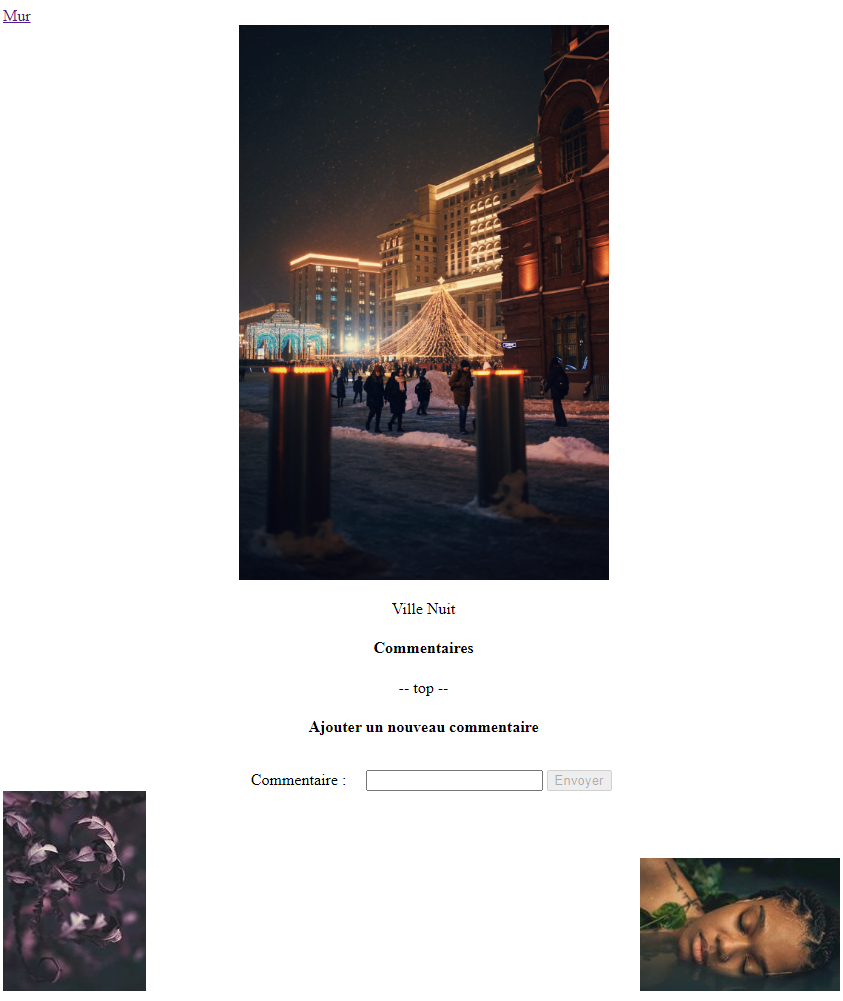
Figure 14.1: The page that displays an image. The thumbnails at the bottom left and right point to the previous and next images.
Code 14.1 shows the part of the web server's code that generates the page displaying an image. This code is relatively complex, because it runs four SQL queries to obtain the information about the images to display and the comments to include. The HTML generation itself is relatively simple, although it would benefit from being moved into a template to make the code easier to read.
else if (req.url.startsWith('/page-image')) {
  let imageId = parseInt(req.url.split('/')[2]);
  const sqlQueryImage = `SELECT * FROM images WHERE id = ${imageId};`;
  const sqlResultImage = await client.query(sqlQueryImage);
  const image = {
      id: sqlResultImage.rows[0].id,
      fichier: sqlResultImage.rows[0].fichier,
      nom: sqlResultImage.rows[0].nom,
      href: `/page-image/${sqlResultImage.rows[0].id}`,
      big: `/public/images/${sqlResultImage.rows[0].fichier}`,
      small: `/public/images/${sqlResultImage.rows[0].fichier.split('.jpg')[0]}_small.jpg`
  };
  const sqlQueryPrevImage = `SELECT * FROM images WHERE id < ${imageId} ORDER BY id DESC LIMIT 1;`;
  const sqlResultPrevImage = await client.query(sqlQueryPrevImage);
  let imagePrev;
  if (sqlResultPrevImage.rows.length === 1) {
    imagePrev = {
      id: sqlResultPrevImage.rows[0].id,
      fichier: sqlResultPrevImage.rows[0].fichier,
      nom: sqlResultPrevImage.rows[0].nom,
      href: `/page-image/${sqlResultPrevImage.rows[0].id}`,
      big: `/public/images/${sqlResultPrevImage.rows[0].fichier}`,
      small: `/public/images/${sqlResultPrevImage.rows[0].fichier.split('.jpg')[0]}_small.jpg`
    };
  };
  let prevHtml = imagePrev ? `<a href="${imagePrev.href}"><img src="${imagePrev.small}"></a>` : '';

  const sqlQueryNextImage = `SELECT * FROM images WHERE id > ${imageId} ORDER BY id ASC LIMIT 1;`;
  const sqlResultNextImage = await client.query(sqlQueryNextImage);
  let imageNext;
  if (sqlResultNextImage.rows.length === 1) {
    imageNext = {
      id: sqlResultNextImage.rows[0].id,
      fichier: sqlResultNextImage.rows[0].fichier,
      nom: sqlResultNextImage.rows[0].nom,
      href: `/page-image/${sqlResultNextImage.rows[0].id}`,
      big: `/public/images/${sqlResultNextImage.rows[0].fichier}`,
      small: `/public/images/${sqlResultNextImage.rows[0].fichier.split('.jpg')[0]}_small.jpg`
    };
  };
  let nextHtml = imageNext ? `<a href="${imageNext.href}"><img src="${imageNext.small}"></a>` : '';

  const sqlQueryComments = `SELECT * FROM commentaires WHERE id_image = ${imageId};`;
  const sqlResultComments = await client.query(sqlQueryComments);
  let imageComments = sqlResultComments.rows.map(comment => comment.texte);
  let commentsHtml = imageComments.map(comment => `<div> -- ${comment} -- </div>`).join('');
  html = `
    <!DOCTYPE html>
    <html lang="en">
    <head>
        <meta charset="UTF-8">
        <meta name="viewport" content="width=device-width, initial-scale=1.0">
        <title>Image</title>
        <link rel="stylesheet" href="/public/style.css">
        <script src="/public/page-image.js" defer></script>
    </head>
    <body>
        <a href="/images">Wall</a>
        <div class="center">
            <img src="${image.big}" width="500">
            <p>${image.nom}</p>
            ${commentsHtml.length!=0?`<h4>Comments</h4>`:''}
            ${commentsHtml}
            <h4>Add a new comment</h4>
            <form action="/image-description" method="POST">
              <input type="hidden" name="numero" id="numero" value="${imageId}">
              <label for="commentaire">Comment: </label>
              <input type="text" name="commentaire" id="commentaire">
              <input type="submit" value="Send">
            </form>
        </div>
        <div>
            <span class="left">${prevHtml}</span>
            <span class="right">${nextHtml}</span>
        </div>
    </body>
    </html>
  `;
  res.end(html);
}
Code 14.1: The part of the server code that generates the page of an image.
This example of the page displaying a single image illustrates the limits of the multi-page approach. Indeed, a click on a thumbnail changes the displayed page only very slightly (only the URLs of the three images and the list of comments change). Yet the whole page is regenerated by the web server. It would be much more efficient for the browser to ask the server only for the new information about the images and comments to display, and to modify the HTML page itself.
The basic principles: exchanging data and modifying the HTML
The goal of the single page approach is to let the browser make the changes to a web page itself, retrieving the information it needs from the web server. This requires two basic principles: exchanging data and modifying the HTML.
The first principle is that the web server provides data to the web browser, and no longer web pages. The data provided by the web server is used by the web browser to display the web pages. To implement this principle, it is recommended to create simple routes in the server, each returning data in JSON format.
In the example of the page displaying a single image, the web server must be able to provide the data about the images and the data about the comments. We therefore propose two routes, one for the images and one for the comments. Code 14.2 shows the web server's code for these routes. You can see that the code follows the same logic as Code 14.1. Splitting it into two routes and removing all HTML generation greatly improves readability.
else if (req.url.startsWith('/page-image')) {
  let imageId = parseInt(req.url.split('/')[2]);
  const sqlQueryImage = `SELECT * FROM images WHERE id = ${imageId};`;
  const sqlResultImage = await client.query(sqlQueryImage);
  const image = {
      id: sqlResultImage.rows[0].id,
      fichier: sqlResultImage.rows[0].fichier,
      nom: sqlResultImage.rows[0].nom,
      href: `/page-image/${sqlResultImage.rows[0].id}`,
      big: `/public/images/${sqlResultImage.rows[0].fichier}`,
      small: `/public/images/${sqlResultImage.rows[0].fichier.split('.jpg')[0]}_small.jpg`
  };
  const sqlQueryPrevImage = `SELECT * FROM images WHERE id < ${imageId} ORDER BY id DESC LIMIT 1;`;
  const sqlResultPrevImage = await client.query(sqlQueryPrevImage);
  let imagePrev;
  if (sqlResultPrevImage.rows.length === 1) {
    imagePrev = {
      id: sqlResultPrevImage.rows[0].id,
      fichier: sqlResultPrevImage.rows[0].fichier,
      nom: sqlResultPrevImage.rows[0].nom,
      href: `/page-image/${sqlResultPrevImage.rows[0].id}`,
      big: `/public/images/${sqlResultPrevImage.rows[0].fichier}`,
      small: `/public/images/${sqlResultPrevImage.rows[0].fichier.split('.jpg')[0]}_small.jpg`
    };
  };

  const sqlQueryNextImage = `SELECT * FROM images WHERE id > ${imageId} ORDER BY id ASC LIMIT 1;`;
  const sqlResultNextImage = await client.query(sqlQueryNextImage);
  let imageNext;
  if (sqlResultNextImage.rows.length === 1) {
    imageNext = {
      id: sqlResultNextImage.rows[0].id,
      fichier: sqlResultNextImage.rows[0].fichier,
      nom: sqlResultNextImage.rows[0].nom,
      href: `/page-image/${sqlResultNextImage.rows[0].id}`,
      big: `/public/images/${sqlResultNextImage.rows[0].fichier}`,
      small: `/public/images/${sqlResultNextImage.rows[0].fichier.split('.jpg')[0]}_small.jpg`
    };
  };
  res.setHeader('Content-Type', 'application/json');
  res.end(JSON.stringify({image, imagePrev, imageNext}));
} else if (req.url.startsWith('/comments')) {
  let imageId = parseInt(req.url.split('/')[2]);
  const sqlQueryComments = `SELECT * FROM commentaires WHERE id_image = ${imageId};`;
  const sqlResultComments = await client.query(sqlQueryComments);
  let imageComments = sqlResultComments.rows.map(comment => comment.texte);
  res.setHeader('Content-Type', 'application/json');
  res.end(JSON.stringify({comments: imageComments}));
}
Code 14.2: The part of the server code that provides the data as JSON.
The second principle of the single page approach is that the HTML is generated entirely on the browser side. This requires extensive use of JavaScript. Moreover, all the browser's default actions that load a new web page (clicking on hyperlinks, submitting forms, etc.) must be disabled. You also need a system to retrieve data from the web server and make changes to the web page.
Code 14.3 shows the code of the page that displays the image using the single page approach. This code includes a fairly complex JavaScript part. It defines the updateImage function, which retrieves the data provided by the server (using the fetch function) and updates the web page according to the retrieved data. You can see that two requests are sent to retrieve the information about the images and the comments. You can also see event handling added to capture clicks on the thumbnails and modify the page without fully refreshing it. Note that the code of this page is incomplete, because form submission is not handled.
<!DOCTYPE html>
<html lang="en">
<head>
    <meta charset="UTF-8">
    <meta name="viewport" content="width=device-width, initial-scale=1.0">
    <title>Image</title>
    <link rel="stylesheet" href="/public/style.css">
</head>
<body>
    <a href="/images">Wall</a>
    <div class="center">
        <img id="image" width="500">
        <p id="nom"></p>
        <div id="commentaires">
        </div>

        <h4>Add a new comment</h4>
        <form action="/image-description" method="POST">
          <input type="hidden" name="numero" id="numero">
          <label for="commentaire">Comment: </label>
          <input type="text" name="commentaire" id="commentaire">
          <input type="submit" value="Send">
        </form>
    </div>
    <div>
        <span id="imagePrev" class="left"></span>
        <span id="imageNext" class="right"></span>
    </div>
</body>

<script>
let imageId = 1;
updateImage(1);

function updateImage(newImageId) {
  imageId = newImageId;
  fetch('/page-image/'+imageId)
  .then(rawData => {
    return rawData.json();
  })
  .then(jsonData => {
    document.getElementById('image').src = jsonData.image.big;
    document.getElementById('nom').innerHTML = jsonData.image.nom;
    document.getElementById('numero').value = jsonData.image.id;
    document.getElementById('imagePrev').innerHTML = '';
    document.getElementById('imageNext').innerHTML = '';
    if (jsonData.imagePrev) {
      let img = document.createElement('img');
      img.src = jsonData.imagePrev.small;
      document.getElementById('imagePrev').appendChild(img);
      img.addEventListener('click', (e) => {
        updateImage(jsonData.imagePrev.id);
      })
    }
    if (jsonData.imageNext) {
      let img = document.createElement('img');
      img.src = jsonData.imageNext.small;
      document.getElementById('imageNext').appendChild(img);
      img.addEventListener('click', (e) => {
        updateImage(jsonData.imageNext.id);
      })
    }
  })

  fetch('/comments/'+imageId)
  .then(rawData => {
    return rawData.json();
  })
  .then(jsonData => {
    let html = '';
    if (jsonData.comments.length != 0) {
      html = '<h4>Comments</h4>';
      html += jsonData.comments.map(comment => '<div> -- ' + comment + ' -- </div>').join('');
    }
    document.getElementById('commentaires').innerHTML = html;
  })
}
</script>
</html>
Code 14.3: The page that displays an image using the single page approach.
The example we have just presented illustrates the two principles of the single page approach. It clearly shows the difference with the classic (multi-page) approach. It also shows how complex the JavaScript code running in the browser becomes. It is precisely to simplify this code that several frameworks have been proposed.
How a single page framework works
Single page frameworks aim to simplify the web browser's JavaScript code. They must support: (1) generating and modifying HTML pages in the browser, (2) accessing the data provided by the web server, and (3) handling user interactions.
Here we propose a minimalist framework inspired by Vue.js. The goal is to understand the role played by single page frameworks and the value they add. Our framework is written entirely in JavaScript in a file named mvue.js (see Code 14.8). It lets you define a web application containing web components. The web application and its components are displayed in a single web page and change according to the user's interactions and the data sent by the web server.
In our framework, the web application and the web components must be written in JavaScript in separate files. For our image wall example, we developed a web application (app.js) containing two components: the wall (images.js) and the image (image.js).
Using our framework requires building a single HTML page that includes our framework, the web application and all the components it contains.
This HTML page is the only HTML page delivered by the web server.
Code 14.4 shows the only HTML page of our image wall application built with our framework.
This HTML page references our framework (mvue.js), the web application (app.js) and the two components (images.js and image.js).
Note that this page defines a <div> tag whose id is app.
This tag will contain the HTML code generated by our framework.
<!DOCTYPE html>
<html lang="en">
<head>
    <meta charset="UTF-8">
    <meta name="viewport" content="width=device-width, initial-scale=1.0">
    <title>My Image Wall</title>
    <script src="/public/mvue.js"></script>
    <script src="/public/webcomp/app.js" defer></script>
    <script src="/public/webcomp/images.js" defer></script>
    <script src="/public/webcomp/image.js" defer></script>
    <link rel="stylesheet" href="/public/style.css">
</head>
<body>
    <div class="center" id="app">
    </div>
</body>
</html>
Code 14.4: The only HTML page of our image wall application built with our mvue.js framework.
Our framework offers a single main function (named createApp) that creates an application. This function takes as input a template that will be executed to display the application (see Code 14.8). It returns an object representing the web application. In our example, the application app.js calls this function. We follow the same convention as Vue.js and store the object representing the web application in a global variable named app. This way, all JavaScript scripts have access to this global variable and can manipulate the web application, for example to add components to it.
The app object offers three methods: mount, component and route. The mount method must be called to attach the application to one of the elements of the HTML page. The component method adds a web component to the application. It takes as input the name of the component and a function that builds the component. The components images.js and image.js call this method. Finally, the route method links a web component to a route, which handles navigation between components. Here again, the two web components of our example use this method.
To generate and modify the HTML code of the application and its components, we chose to include a templating approach in our framework. It runs in the web browser (and not on the server, as presented in the appendix on templating). Vue.js makes the same choice. Our framework therefore contains two functions (parse and createGenerateFunction) that implement this templating approach (see Code 14.8). These functions are called by the renderComponent function, which displays the application and the web components. Note that the templates are written directly in the web application and in the components, each of which defines its own template. For the web application, the template is passed as a parameter to the createApp function. For web components, the template must be defined in the template property of the object returned by the component's creation function.
For data management, each component defines its data access method in the data property of the object returned by the component's creation function. For example, for the image wall component, the data access function calls the web server to retrieve all the information about the images (see Code 14.6). Note that the data access method is executed by our framework during the call to the display function renderComponent.
For interaction handling, each component defines the handlers it runs in response to user events. This is done in the events property of the object returned by the component's creation function. In our example, the component that displays an image runs a handler when the comment form is submitted (see Code 14.7).
Finally, our framework provides routing between web components using the anchor part of a URL and a listener on the hashchange event.
The route method registers a component for an anchor so that the framework displays it.
For example, the instruction app.route('/images','images'); adds the images component to the route /images.
So, assuming the application runs on the local machine, accessing the URL http://localhost:8080/#/images routes to the image wall component.
let appTemplate =
    `<img src="/public/logo.png" alt="logo">
    <p>
        Here you will find all the images I love.
    </p>
    <div>
        <a href="#/image?imageId=1"><img src="/public/images/image1_small.jpg"></a>
        <a href="#/image?imageId=2"><img src="/public/images/image2_small.jpg"></a>
        <a href="#/image?imageId=3"><img src="/public/images/image3_small.jpg"></a>
    </div>
    <a href="#/images">All the images</a>`;

let app = createApp(appTemplate);

app.mount('#app');

console.log('app is ok');
Code 14.5: The component app.js, which represents the web application.
app.component('images',(props) => {
    return {
        template: `<a href="#/index">Index</a>
                    <div class="center">
                        <h1>Image wall</h1>
                    </div>
                    <div id="mur">
                        <% for (let image of images) { %>
                            <a href="#/image?imageId=<%=image.split('image')[1]%>"><img src="/public/images/<%=image%>_small.jpg"></a>
                        <% } %>
                    </div>`,
        data: () => {
            return fetch('/images')
            .then((res) => {
                if (res.ok) {
                    return res.json();
                } else {
                    return Promise.reject();
                }
            })
        }
    }
})

app.route('/images','images');

console.log('images is ok');
Code 14.6: The component images.js, which represents the image wall.
app.component('image',(props) => {
    return {
        template: `<a href="#/images">Wall</a>
        <div class="center">
            <img src="/public/images/image<%=imageId%>.jpg" width="500">
            <p>Beautiful picture</p>
            <% if (comments.length > 0) { %>
                <h4>Comments</h4>
            <% } %>
            <%= comments.map(comment => '<div> -- ' + comment + ' -- </div>').join('') %>
            <h4>Add a new comment</h4>
            <form action="/image-description" method="POST">
            <input type="hidden" name="numero" id="numero" value="<%=imageId%>">
            <label for="commentaire">Comment: </label>
            <input type="text" name="commentaire" id="commentaire">
            <input type="submit" value="Send">
        </form>
        </div>
        <div>
            <span class="left">
                <% if (parseInt(prevId)>0) { %>
                    <a href="#/image?imageId=<%=prevId%>"><img src="/public/images/image<%=prevId%>_small.jpg"></a>
                <% } %>
            </span>
            <span class="right">
                <% if (parseInt(nextId)<=images.length) { %>
                    <a href="#/image?imageId=<%=nextId%>"><img src="/public/images/image<%=nextId%>_small.jpg"></a>
                <% } %>
            </span>
        </div>`,
        data: () => {
            return Promise.all([fetch('/images'),fetch('/comments/'+props.imageId)])
            .then(([imagesRes,commentsRes]) => {
                if (imagesRes.ok && commentsRes.ok) {
                    return Promise.all([imagesRes.json(), commentsRes.json()]);
                } else {
                    return Promise.reject();
                }
            })
            .then(([imagesJSON, commentsJSON]) => {
                return {
                    imageId : parseInt(props.imageId),
                    images : imagesJSON.images,
                    comments : commentsJSON.comments,
                    prevId : parseInt(props.imageId)-1,
                    nextId : parseInt(props.imageId)+1
                }
            })
        },
        events: [
            {
                kind: 'submit',
                target: 'FORM',
                listener: (e) => {
                    e.preventDefault();
                    let commentaire = document.getElementById('commentaire').value;
                    let params = {
                        "imageNumber": props.imageId,
                        "description": commentaire
                    }
                    let formBody = [];
                    for (var property in params) {
                        let encodedKey = encodeURIComponent(property);
                        let encodedValue = encodeURIComponent(params[property]);
                        formBody.push(encodedKey + "=" + encodedValue);
                    }
                    formBody = formBody.join("&");

                    fetch('/image-description', {method:'POST', body: formBody})
                    .then((res)=> {
                        alert('Your comment has been saved');
                    })
                }
            }
        ]
    }
})

app.route('/image','image');

console.log('image is ok');
Code 14.7: The component image.js, which represents a single image.
function createApp(template) {
    const HTML = "HTML";
    const JS = "JS";
    const JS_VAL = "JS_VAL";
    let _template = template;
    let _componentFactories = [];
    let _routes = [];
    let _root;

    return {
        mount : function(selector) {
            _root = document.querySelector(selector);
            renderComponent({template:_template, data: ()=> Promise.resolve({})}, _root);
        },
        component : function(name, componentFactory) {
            _componentFactories[name] = componentFactory;
        },
        route(route, componentName) {
            _routes[route] = componentName;
        }
    }

    function renderComponent(component, root) {
        return component.data()
        .then((data) => {
            console.log('data in render');
            console.log(JSON.stringify(data));
            let parts = parse(component.template);
            let generateFunction = createGenerateFunction(parts, data);
            root.innerHTML = generateFunction();
        })
    }

    function parse(template) {
        let parts = [];
        let current = {type: HTML, value: ''};
        for (let i=0 ; i < template.length ; i++) {
            if (current.type === HTML) {
                if (i < template.length-1 && template[i] === '<' && template[i+1] === '%') {
                    parts.push(current);
                    if (i < template.length-2 && template[i+2] === '=') {
                        current = {type: JS_VAL, value: ''};
                        i += 2;
                    } else {
                        current = {type: JS, value: ''};
                        i++;
                    }
                } else {
                    current.value += template[i];
                }
            } else {
                if (i < template.length-1 && template[i] === '%' && template[i+1] === '>') {
                    parts.push(current);
                    current = {type: HTML, value: ''};
                    i++;
                } else {
                    current.value += template[i];
                }
            }
        }
        if (current.value !== '') {
            parts.push(current);
        }
        return parts;
    }

    function createGenerateFunction(templateParts, parameters) {
        let dataAsVariable = Object.getOwnPropertyNames(parameters).map(p => `let ${p} = ${JSON.stringify(parameters[p])};\n`).join('');
        let rendering = {type:HTML, value:dataAsVariable+'let html = `'};
        for (let i = 0; i < templateParts.length; i++) {
            if (rendering.type === HTML) {
                if (templateParts[i].type === HTML) {
                    rendering.value += templateParts[i].value;
                } else if (templateParts[i].type === JS) {
                    rendering.value += '`;\n';
                    rendering.value += templateParts[i].value;
                    rendering.type = JS;
                } else {
                    rendering.value += '${'+templateParts[i].value+'}';
                }
            } else if (rendering.type === JS) {
                if (templateParts[i].type === HTML) {
                    rendering.value += 'html += `' + templateParts[i].value;
                    rendering.type = HTML
                } else if (templateParts[i].type === JS) {
                    rendering.value += templateParts[i].value;
                } else {
                    rendering.value += 'html += `${'+templateParts[i].value+'}';
                    rendering.type = HTML;
                }
            }
        }
        if (rendering.type === HTML) {
            rendering.value += '`;';
        }
        rendering.value += 'return html';
        return new Function(rendering.value);
    }

    function addListeners(component) {
        if (component.events && component.events.length > 0) {
            component.events.forEach((e) => {
                console.log(JSON.stringify(e));
                document.querySelector(e.target).addEventListener(e.kind, e.listener);
            })
        }
    }

    window.addEventListener('hashchange', (e) => {
        let route = window.location.hash.substring(1).split('?')[0];
        console.log(route);
        if (_routes[route]) {
            console.log(_routes[route]);
            let componentFactory = _componentFactories[_routes[route]];
            if (componentFactory) {
                console.log('there is a factory');
                let params = {};
                if (window.location.hash.substring(1).split('?')[1]) {
                    window.location.hash.substring(1).split('?')[1].split('&').forEach((nameValue) => {
                        let name = nameValue.split('=')[0];
                        let value = nameValue.split('=')[1];
                        params[name] = value;
                    });
                }
                e.preventDefault();
                let component = componentFactory(params);
                renderComponent(component, _root).then(()=> {addListeners(component)});
            }
        }
    });
}
Code 14.8: The code of our mvue.js framework.
This appendix presents the single page approach. Remember the following three points:
- The principle of the single page approach is to load a single HTML page and modify it dynamically according to the user's interactions.
- In a single page approach, the web server no longer provides HTML but only data (in JSON format).
- Frameworks that support single page applications handle the display and modification of the HTML, data access and user interactions.